Legacy Billing Structure
This is a legacy documentation
The following documentation is deprecated and is kept here until all customers migrate to new subscription plans.
New plans and support is defined by signageOS pricing.
signageOS Pricing works in two tiers - Company Plan and Device Plan. You always have 1 Company Plan and any number of Device Plans based on your deployed device networks.
Company Plans
| Company Plans | It's best fit for |
|---|---|
| Open | You want to build your management features and deploy core apps independently of the signageOS Cloud. |
| Starter | Ideal solution for companies with smaller networks who require support assistance, but don't need an SLA. |
| Business | Great for companies of any size that take digital signage seriously, require an SLA, and additional levels of support. |
| Enterprise | For large organizations with global deployments that depend on the highest SLA, strongest management features, and unrivaled 24/7 support. |
How to change Company Plan
You can request the change of Company Plan anytime in Box, or reach out to our support team.
Device Plans
Once you start deploying devices you group them into Organizations. Organization is usually a device network deployed for one of your customers.
For each of your Organizations (aka your customer) you can select the best Device Plan that fits your customer.
| Device Plans | It's best fit for |
|---|---|
| Open | Best if you want to develop everything by your own, no out-of-Box device management |
| 1.0 | Essential management and monitoring features for basic deployments |
| 2.0 | The ideal plan for medium-size network where you need all the management and medium monitoring |
| 3.0 | The best set of features for complex network deployments, non-stop monitoring and all the management |
How to select the Device Plan
You can select the Device Plan type when creating a new Organization:
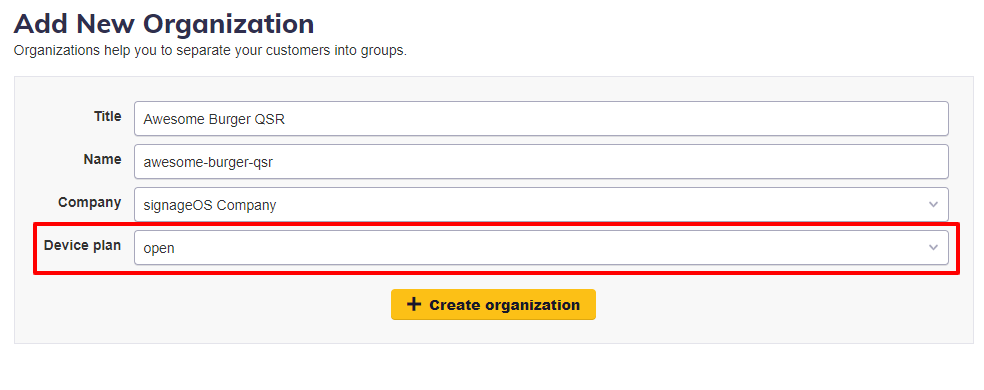
Or you can set the Device Plan over the REST API:
PUT /organization/:organizationUid/subscriptionType/:subscriptionType
How to change the Device Plan
- You can change the Device Plan via REST API or inside the Organization page in Box.
- You can upgrade anytime to higher Device Plan and get instantly new features
- You can downgrade anytime to a lower Device Plan, but the change will apply from the first day of the next month
Default Device Plan
By default is each Organization created with Device Plan 3.0. You can change to the different default Device Plan in Box, under your Company profile.
- Sign in to Box
- Navigate to Settings -> Company
- Select default Device Plan
Billing
You are billed at the end of the month based on your Company Plan and the number of devices in Organizations and their respective Device Plans.
Example
You are using Company Plan Business, and you deployed 4 device networks grouped in 4 Organizations.
| Company Plan |
|---|
| Business |
| Organizations | Device Plan | Number of Devices |
|---|---|---|
| MamaPapa Coffee | Open | 1 |
| Burger Bar | 2.0 | 348 |
| Dragon Queen | 3.0 | 1.420 |
| Gorilla Park | 3.0 | |
| 2.938 |
|
Based on the current usage, here is an example bill at the end of the month.
Prices below are strictly explanatory and are not a business offer or quote in any way
| Bill | Quantity | Total |
|---|---|---|
| Company Plan Business | 1 month | $ 499 |
| Device Plan Open | 1 device | $ 0 |
| Device Plan 2.0 | ||
| 348 devices |
| $ 870 | | Device Plan 3.0 | 4.358 devices | $ 13.074 |
You can review your current usage in Box.