Nexmosphere Supported devices
Link to website:
https://nexmosphere.com/ Link to Nexmosphere documentation:
http://nexmosphere.com/document/API_Manual_Q1_2020.pdf
Sensor types
- RFID antennas
- Buttons
How to use
NPM
If you are using npm, you can install the Nexmosphere library like this:
npm add @signageos/front-applet-extension-nexmosphere
You can see the full example on our Github.
Standalone library
Alternatively, you can download the standalone library and add it to your HTML.
You can see the full example on our Github.
Additional Notes
Addressing ports
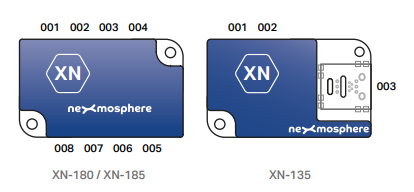
Usually, you attach different sensors to the Nexmosphere controller. In order to make the communication between sensor and API work, you need to address the correct port during the initialization:
// Initiate Nexmosphere Driver
const nexmosphere = await createNexmosphere();

// Address the RFID antenna based on the port it is connected to
const rfidAntennaAddress = 1;
const rfidAntenna = nexmosphere.createRfidAntenna(rfidAntennaAddress);
Here is the Nexmosphere controller map: