signageOS REST APIs for device management
To use REST API, you need Device Plan Pro and above. REST API does not work on the legacy Open Device Plan or Basic without REST API add-on.
The REST API brings extra features for signageOS Platform customers with out-of-the-box device management, monitoring, and maintenance service provided by signageOS. With existing, scalable, and flexible solutions you can easily integrate advanced features into your CMS via standardized REST API. No need to re-invent the wheel again.
All APIs are standardized and available across all supported devices.
List of REST API Domains
| Domain | Description |
|---|---|
| Device | Configure the device, set timers, brightness, volume, update application, update firmware and much more, get device uptime, temperature, outages, content status or custom logs |
| Applet Management | Way to create your own Applets and its versions over API instead of Box |
| Timing Management | Timing REST API helps you schedule Applets (your HTML player) on the devices |
| Organizations Management | Organization REST API helps you to create/delete organizations and retrieve security tokens |
| Accounts Management | User REST API helps you to manage your account and retrieve security tokens |
REST API Authentication
For REST API your application needs to be authenticated using request Header: X-Auth.
You can create your private token to access the selected Organization.
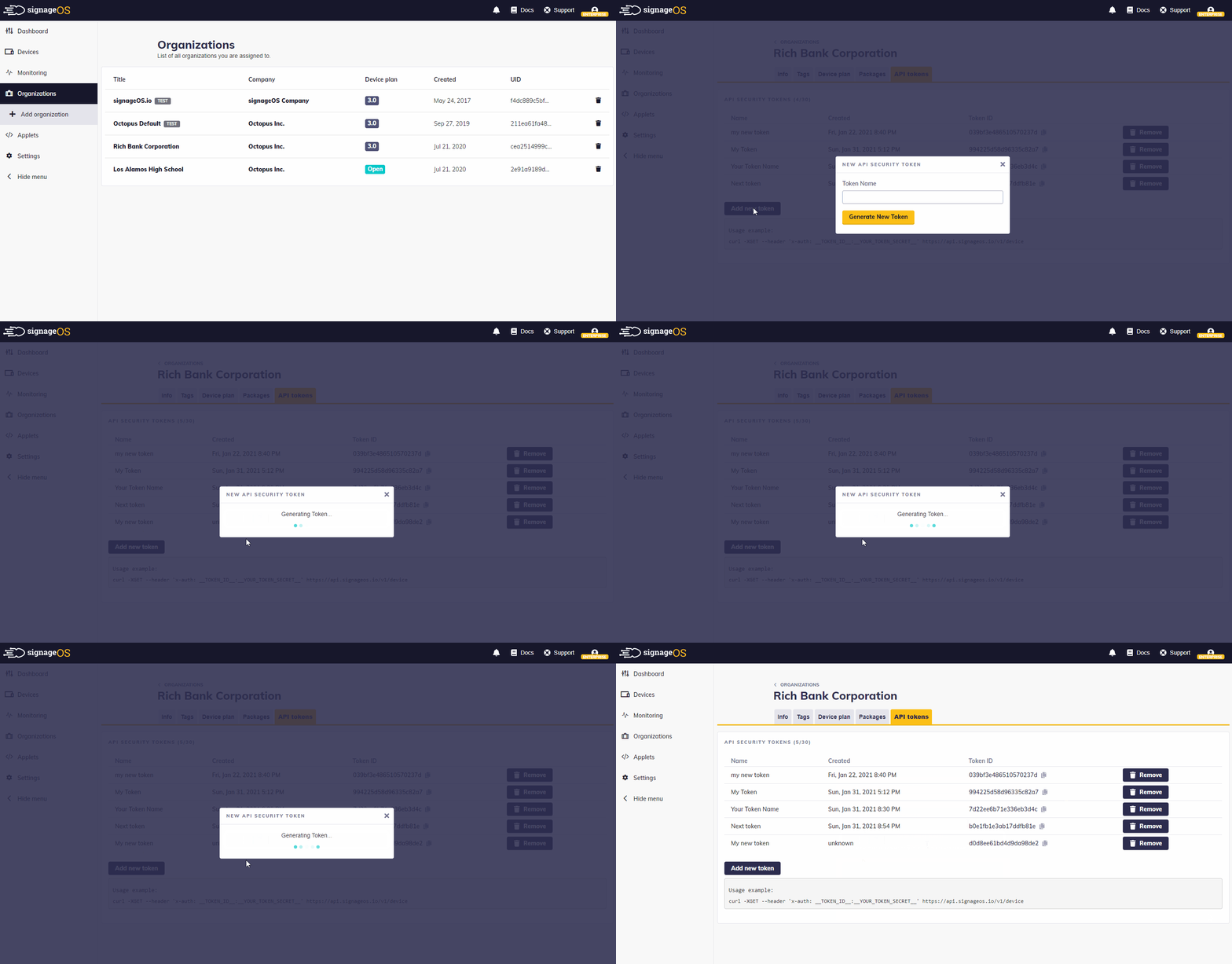
How to generate X-Auth token
- Go to Organizations section in signageOS Box
- Select Organization you need the token for
- Select API Token tab
- Fill in name for your Token and press Add new token
- Once generated, save the Token ID and Token Secret.
Token Secret is only available at a time of creating a token. It's not visible once you close the modal window.
Use X-Auth token
Use generated token as X-Auth header separated by colon. E.g __TOKEN_ID__:__TOKEN_SECRET__
# X-Auth = token_id:token_secret
curl -XGET --header 'x-auth: c19ae9e88d89ac705295:46595b112172e013efae6ffa73015f3d0e43f1d9'
  https://api.signageos.io/v1/device
Keep in mind that after you reload the page the token will disappear.
API Reference
Would you like to jump in and test our API? We use Postman collection to test and preview our APIs. Get the collection on the link below:
REST API Collection
Check all REST API as a Postman collection
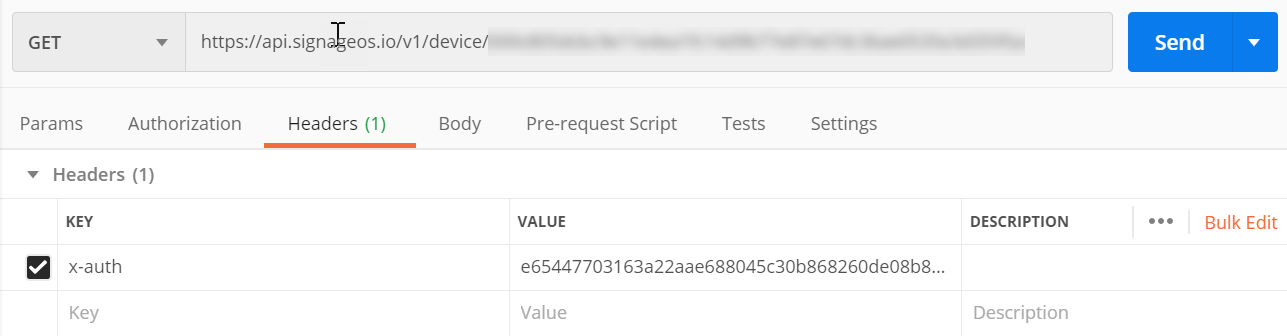
If you want to test the specific device you will need to provide Postman with the authorization credentials for your organization: X-Auth token_id and X-Auth token_secret.
You have to add the x-auth header in the Headers Postman section in the following format token_id:token_secret
REST API Request Quota
signageOS REST API automatically applies quotas on REST requests. Quota is counted per IP address of the Request origin.
Quota is set to 200 requests per second for instant response and 500 queued requests with slightly delayed response based on request type and performance.
If you reach the quota API returns 429 Too Many Requests response.
It is important to note that after creating an Organization through REST API, the default Device plan is set to 3.0. This can be changed from within SignageOS Box under your Company profile.