Testing the connection to the new network endpoint
Testing the connection to the new network endpoint
This tool allows you to manually switch a selected device to the new device gateway endpoint and verify that it works correctly within your customer's network, with their firewall settings, etc. This is a preparatory step before the full migration of all devices, which will take place in the next three months.
Goal: To ensure your network infrastructure is ready for the upcoming company-wide change.
Important notice and context
Before using the tool, please read the information about the upcoming change and new network requirements: Read more about the upcoming change in the announcement.
Important: The configuration change is applied to the device within 2 minutes.
Device switching procedure
The test switch can be found in Box on the device detail page.
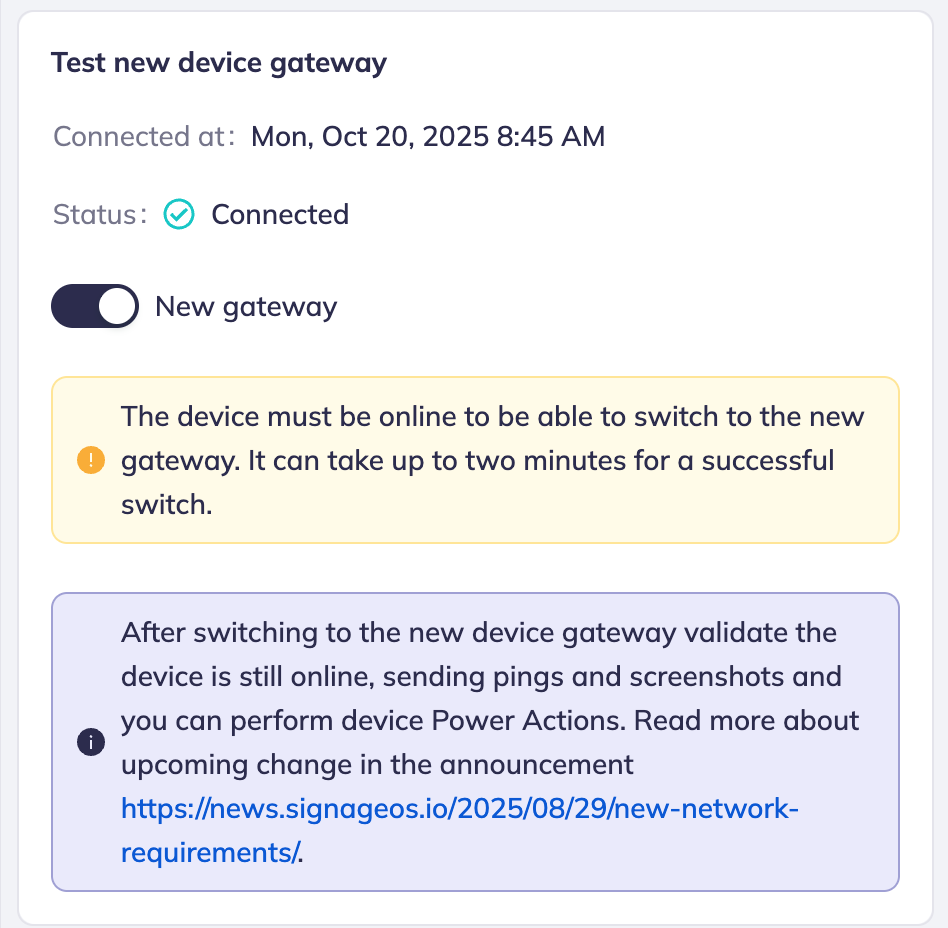
Locating the switcher
- In Box, navigate to the detail page of the device you want to test
- Go to the Info tab
- Go to section Test new device gateway
Initiating the test
- Toggle the switch to the New gateway position.
- After switching, the device status will change to Pending.
- Box will start monitoring whether the device connects to the new endpoint gateway.root.signageos.io.
- The configuration change should be applied to the device within 2 minutes.
Validation and feedback
Once the device attempts to connect to the new endpoint, Box will display feedback, and the status will automatically update:
| Status | Feedback and Notification | User Action |
|---|---|---|
| Success | "Connected" The switcher remains in New gateway mode. | Perform recommended validation (see below). No further changes are needed. |
| Failure | "Disconnected" The switcher remains in New gateway mode. | Must switch back to the old gateway: Toggle the switch back to original position and investigate network/firewall settings |